Amazon White Background Photos with AI: Keep the Shadows, Lose the Studio
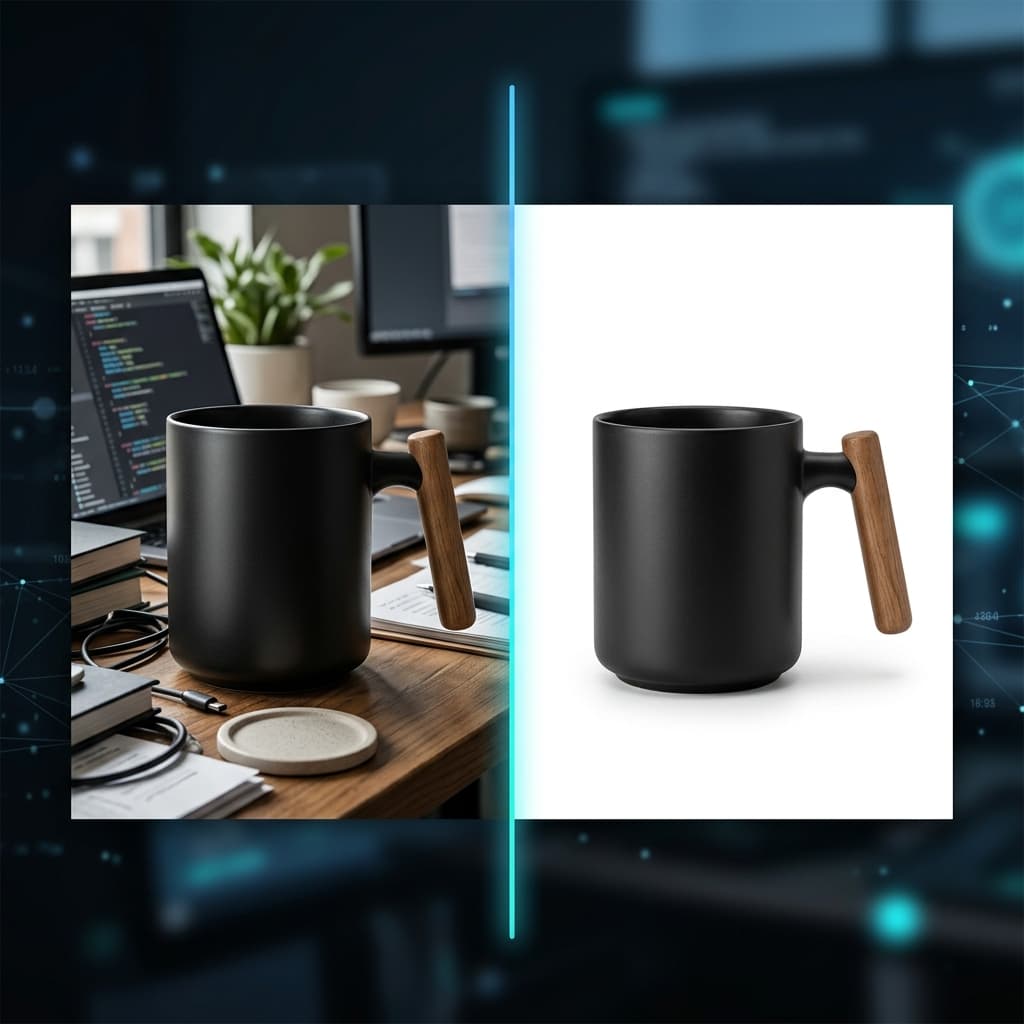
The Suppressed Listing Problem
You've spent weeks sourcing the perfect product, negotiating with suppliers, and optimizing your listing copy. Then you upload your main image, and within 48 hours Amazon sends you a notification: "Your listing has been suppressed."
The most common reason? Your main image doesn't meet Amazon's white background requirements. Not "close enough" white. Not off-white. Not light gray. Amazon demands pure white — RGB (255, 255, 255) — and their automated systems are getting better at catching violations every year.
In 2026, this isn't just an Amazon quirk. It's table stakes for selling on any major marketplace: Walmart requires similar standards, eBay recommends them, and Shopify stores with clean white hero images consistently outperform those without.
What Amazon Actually Requires (The Specs That Matter)
Amazon's image guidelines are detailed, but most sellers only learn them after a suppression. Here's what your main image (MAIN) must satisfy:
| Requirement | Specification | Why It Matters |
|---|---|---|
| Background color | Pure white RGB (255, 255, 255) | Non-white backgrounds trigger automatic suppression |
| Minimum size | 1000px on the longest side (recommended: 2000px+) | Enables zoom on mobile, which increases conversion |
| Product fill | Product should occupy ≥85% of the image area | Maximizes visibility in search grid thumbnails |
| Text and logos | None allowed on main image | Immediate suppression if detected |
| Watermarks | Strictly prohibited | Listing removal, possible account warning |
| Borders and frames | Not allowed | Triggers automated review |
| File format | JPEG (.jpg), PNG, TIFF, or GIF | JPEG is the most universally accepted |
Why Most Background Removers Fail
There's no shortage of background removal tools in 2026. Remove.bg, Photoroom, Canva — they all do a decent job of cutting out your product. The problem isn't the cutout. The problem is what happens after.
The "Floating Product" Effect
When you remove the background completely, you also remove the natural shadow where the product meets the surface. The result is a product that looks like it's floating in a white void. It's uncanny, and buyers notice — even if they can't articulate why the image feels "off."
A product without a contact shadow looks:
- Cheaper and less premium
- Like a stock render rather than a real photograph
- Untrustworthy — "Is this what I'll actually receive?"
Professional studio photographers spend significant time carefully controlling shadows. A gentle, natural shadow at the base of a product grounds it in reality, communicates weight and dimension, and makes the entire image feel real.
The Opposite Problem: Shadow Contamination
Other tools attempt to preserve shadows but do it poorly. The shadow bleeds into gray-ish tones around the product base, and now you have an image that:
- Technically isn't "pure white" (RGB 255) — Amazon's scanner flags it
- Looks dirty and unprofessional
- Requires manual cleanup in Photoshop, which defeats the purpose of automation
The Sweet Spot: Clean White + Natural Shadow
What you actually need is a tool that understands the difference between background and shadow. The background should be pure white to pass Amazon compliance. But the subtle contact shadow — the thin, soft gradient right at the product base — should be preserved because it makes the product look real.
This is the approach modern AI image generation takes. Instead of cutting and pasting your product onto a white rectangle, the AI re-renders the entire scene: your real product placed on a clean white surface with physically accurate soft lighting. The background is genuinely white. The shadow is genuinely natural.
Traditional Routes and What They Cost
Let's compare your options for getting Amazon-compliant white background photos with proper shadows:
| Method | Cost per Image | Turnaround | Shadow Quality |
|---|---|---|---|
| Professional studio shoot | $15–$50 | 3–7 business days | Excellent — real light, real shadows |
| Freelance photographer | $5–$25 | 2–5 business days | Good — depends on skill level |
| Basic BG remover (Remove.bg, etc.) | $0.20–$2.00 | Instant | Poor — floating product, no shadow |
| BG remover + manual Photoshop shadow | $3–$10 (with your time) | 15–30 min per image | Decent — but doesn't scale |
| AI scene generation | $0.25 | 30–60 seconds | Very good — AI-rendered realistic contact shadow |
Budget Reality: Launching 50 Products
Most FBA sellers don't launch a single product. They launch collections. Here's what the numbers look like when you need hero images for 50 SKUs:
50 hero images: budget comparison
That's a 100x cost difference between a professional studio and AI generation. For a new seller bootstrapping their first brand, this is the difference between being able to launch and not.
Step-by-Step: Creating Amazon-Compliant Photos with ReCardEx
Here's the actual workflow, from phone photo to published listing.
Step 1: Take a decent source photo
You don't need a DSLR. A modern smartphone works perfectly. The key requirements:
- Good, even lighting (natural window light works great)
- Product in sharp focus, filling most of the frame
- Any background — it will be replaced entirely
That's it. No lightbox required, no special setup. The AI handles the rest.
Step 2: Upload to ReCardEx Studio
Open the Studio and drop your photo. The system automatically analyzes your product — detecting its category, edges, and key features. This takes about 10 seconds.
Step 3: Select the white background preset
Choose the "Pure White Studio" preset. The AI generates your product on a clean white background with natural lighting and a subtle contact shadow at the base. Output resolution is 2K by default — comfortably above Amazon's 2000px recommendation.
Step 4: Review and download
Generation takes 30–60 seconds. The result is a high-resolution JPEG with:
- Pure RGB (255, 255, 255) white background — verified compliance
- Natural contact shadow — product looks grounded and real
- Your actual product preserved accurately — same shape, colors, textures, logos
Beyond the Main Image: Your Full Amazon Listing Stack
Amazon allows up to 9 images per listing. The main image must be pure white background, but the supplementary slots are where you tell your product's story:
| Slot | Best Practice | How AI Helps |
|---|---|---|
| Main image | Pure white background, product fills 85%+ | AI white studio preset with natural shadows |
| Slots 2–3 | Additional angles (back, side, detail) | Generate from same source photo with different viewpoints |
| Slots 4–5 | Lifestyle context (product in use) | AI lifestyle scene generation — kitchen, office, outdoors |
| Slots 6–7 | Infographic cards (features, dimensions) | AI infographic card mode with text callouts |
| Video slot | 8-second product showcase | AI video generation with controlled camera movement |
The most efficient approach is generating your entire listing stack — hero, angles, lifestyle, infographics, and video — from a single source photo in one session. For a breakdown of what this costs across different methods, see our complete cost breakdown for marketplace product cards.
Common Mistakes That Get Listings Suppressed
Even experienced sellers fall into these traps. A quick checklist before you upload:
- Leaving a thin gray border. Some tools leave a 1–2px gray edge around the product cutout. Amazon's scanner catches this. Always verify the edges at 200% zoom.
- Adding promotional text to the main image. "Best Seller", "50% Off", or even your brand name overlaid on the main photo — all prohibited. Save it for A+ Content.
- Using lifestyle photos as the main image. Your product on a wooden table looks great — in slot 4. For the main image, it's an instant suppression.
- Upscaling low-resolution photos. Stretching a 500px image to 2000px creates visible artifacts. Start with a good source photo or use AI upscaling that adds genuine detail.
The Bottom Line
Amazon's white background requirement isn't going away — if anything, enforcement is getting stricter. The sellers who succeed are the ones who treat compliance not as a headache, but as a baseline that they build quality on top of.
A pure white background with a natural contact shadow is the gold standard. It passes automated review, it looks professional, and it converts. In 2026, you no longer need a studio or Photoshop skills to achieve it.
Try it yourself — every new ReCardEx account comes with 50 free coins, enough to generate two full product photos and see the quality firsthand before spending a dollar. For a deeper look at how we compare to other AI tools, check our comparison of 8 AI product photography services.
Ready to transform your shop?
Join thousands of sellers using ReCardEx to grow their business.
Get Started